

Selecting the right processor for your Windows PC impacts performance, efficiency, and overall usability. Whether you’re a gamer, content creator, or general user, understanding key factors will help you make an informed decision.
What is a Processor?
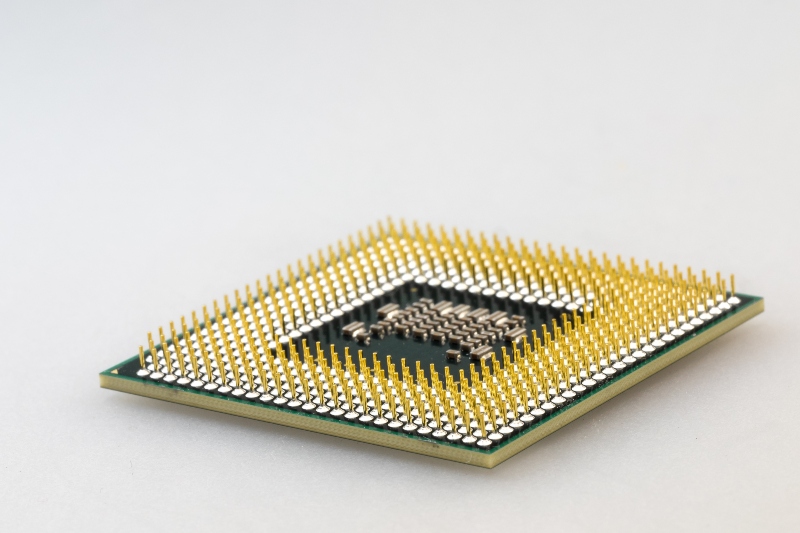
A processor (CPU) is the core component of a computer, responsible for executing instructions and managing system performance. A more powerful CPU enhances speed, responsiveness, and multitasking capabilities, ensuring a smoother computing experience.
Latest Processors and Their Core Counts (as of March 2025)
- Intel Core i9-14900KS:
- Total Cores: 24
- Performance Cores (P-cores): 8Efficient Cores (E-cores): 16
- Total Cores: 24
- AMD Ryzen 9 9950X:
- Total Cores: 16Total Threads: 32Max Boost Clock: Up to 5.7 GHz
For users seeking top-tier performance, both processors offer substantial capabilities. The choice between them may depend on specific workload requirements and platform preferences.
AMD vs. Intel: The Key Competitors

Two leading brands dominate the processor market:
- AMD: Offers higher core and thread counts at competitive prices, making it ideal for multitasking and productivity.
- Intel: Known for strong single-core performance, making it a great choice for gaming and general computing tasks.

Factors to Consider When Choosing a Processor
1. Determine Your Usage Needs
Your CPU choice should align with your primary activities:
- Gaming: Prioritize high clock speeds and single-core performance. Intel Core i5/i7 and AMD Ryzen 5/7 are solid options.
- Content Creation: Choose high-core-count CPUs like AMD Ryzen 9 or Intel Core i9 for video editing, 3D modeling, and streaming.
- General Use: For browsing, streaming, and office work, entry-level CPUs like AMD Ryzen 3 or Intel Core i3 are sufficient.
2. Core Count and Threads
Cores determine how many tasks a CPU can handle at once, while threads enhance task execution:
- Dual-Core: Best for basic tasks like web browsing and office applications.
- Quad-Core: Suitable for multitasking and light gaming.
- Hexa-Core or Higher: Recommended for gaming, content creation, and resource-heavy applications.
Modern CPUs use Simultaneous Multithreading (SMT) or Hyper-Threading, allowing each core to manage multiple tasks. This enhances multitasking and speeds up demanding workflows.
3. Clock Speed and Performance
Measured in GHz, clock speed defines how fast a CPU processes instructions:
- 3.0 GHz – 3.5 GHz: Suitable for everyday tasks.
- 3.6 GHz – 4.5 GHz: Ideal for gaming and multitasking.
- 4.6 GHz and Above: Best for professionals handling 3D rendering, video editing, and simulations.
While higher clock speeds improve performance, efficiency and core count also matter. Processors like Intel’s Core i-series and AMD’s Ryzen lineup balance speed with power consumption for optimal efficiency.
AMD vs. Intel: Which Should You Choose?
When to Choose AMD
- You need more cores and threads for multitasking.
- You want high performance on a budget.
- You plan to overclock for extra speed.
When to Choose Intel
- Gaming is a priority, and you need high clock speeds.
- You want power-efficient performance.
- You prefer integrated graphics without a dedicated GPU.
Enhancing Your System’s Security
Regardless of your CPU choice, keeping your system secure is essential.
Tweaking PC Repair helps:

- Repair Windows Firewall to enhance network security.
- Fix Windows Update issues caused by broken updates.
- Ensure Windows Defender and Firewall work efficiently while repairing malware-related damage.
Download and install Tweaking now to optimize your system.
Conclusion
Choosing the right processor depends on performance needs, budget, and future scalability. Whether you prefer AMD’s multitasking power or Intel’s gaming efficiency, analyzing your workload will help you find the best CPU for your Windows PC.
Menzi Sumile
Verified at:
29/05/2024 06:37
Comments are closed.