
Esselbach Contentteller CMS

  • Programs
  • Articles
  • News
  • Links
  • About
    • Virus, Malware & Rootkit Cleanup Links
  • Forums
Site Search
Loading

Programs
· Tweaking.com Programs

Articles
· Tips and Tweaks
· Virus, Malware & Rootkit Cleanup Links


Donate
All our programs are completely free. We are 100% advertising and donation supported.

Top Programs collapse/expand
· Windows Repair (All In One)
· Simple System Tweaker
· Advanced System Tweaker
· Repair Windows Firewall
· System Information Tool
· Registry Backup
· Reset Registry Permissions
· Repair Internet Explorer
· Repair Winsock & DNS Cache
· Repair Hosts File

Top Articles collapse/expand
· Virus, Malware & Rootkit Cleanup Links
· Tweaking.com - Windows Repair (All In One) Tips
· Increase Network Performance
· IP/DNS Tweak
· Tweaking.com - Advanced System Tweaker Online Help
· Fix/Repair File Permissions
· Should I Turn Off My Computer (Most commonly asked question)
· Tweaking.com - Registry Backup Online Help & FAQ
· Right-Click Tweaks (2000, XP, Vista, 2003, 2008 & 7)
· Increase Windows Performance By Changing Visual Effects (XP, Vista & 7)

News collapse/expand
  • Latest
  • Top

· Tweaking.com - Windows Repair (All in One) v1.9.14 Released
· Tweaking.com - svchost.exe Lookup Tool v1.5.0 Released
· Tweaking.com - Windows Repair (All in One) v1.9.13 Released
· Tweaking.com - Advanced System Tweaker v2.0.0 Released
· Tweaking.com - Windows Repair (All in One) v1.9.12 Released
· Tweaking.com - Advanced System Tweaker v1.2.0 Released
· Two Program Updates
· Tweaking.com - Registry Compressor v1.0.0 Released
· Tweaking.com - Windows Repair (All in One) v1.9.10 Released
· Tweaking.com - Windows Repair (All in One) v1.9.9 Released
· Tweaking.com - Simple Performance Boost v1.0.2 Released
· Login issue fixed.
· Tweaking.com - Windows Repair (All in One) v1.5.3 Released
· Tweaking.com - Windows Repair (All in One) v1.6.4 Released
· Tweaking.com - Simple Performance Boost v1.0.5 Released
· Tweaking.com - Windows Repair (All in One) v1.5.2 Released
· Soft launch - Forums coming soon.
· Tweaking.com - Windows Repair (All in One) v1.8.0 Released
· 3 Programs Updated
· Tweaking.com - Windows Repair v1.0 Released

Top Links collapse/expand
· PcWinTech.com
· SimplePortForwarding.com
· Microsoft Support


Tweaking.com » Overview» Tweaking.com Programs » Windows Repair (All In One)

Windows Repair (All In One)

Tweaking.com - Windows Repair is an all-in-one repair tool to help fix a large majority of known Windows problems including registry errors and file
permissions as well as issues with Internet Explorer, Windows Update, Windows Firewall and more. Malware and installed programs can modify your default settings. With Tweaking.com - Windows Repair you can restore Windows original settings.


The program is still young and needs to grow.
My goal is to have a repair tool that can save someone from having to do a reinstall.
To help those people who can't afford a computer tech, and of course to help my fellow techs out there.
So if you have any problems, repair ideas or suggestions to make the program better please post in the forum and let me know :-)


For Windows XP, 2003, Vista, 2008, 7, 8 (32 & 64 Bit)

Tweaking.com - Windows Repair (All In One) Tips

v1.9.14

Installer (5.30 MB)

- Mirror #1 MajorGeeks.com

- Mirror #2 OlderGeeks.com
- Mirror #3 BleepingComputer.com
- Mirror #4 TechSpot.com

- Direct Download


Portable (3.36 MB)

- Mirror #1 MajorGeeks.com

- Mirror #2 SnapFiles.com
- Mirror #3 OlderGeeks.com
- Mirror #4 BleepingComputer.com
- Mirror #5 TechSpot.com

- Direct Download


Tweaking.com - Windows Repair can do the following:

Reset Registry Permissions
Reset File Permissions
Register System Files
Repair WMI
Repair Windows Firewall
Repair Internet Explorer
Repair MDAC & MS Jet
Repair Hosts File
Remove Policies Set By Infections
Repair Icons
Repair Winsock & DNS Cache
Remove Temp Files
Repair Proxy Settings
Unhide Non System Files
Repair Windows Updates
Repair CD/DVD Missing/Not Working
and more...


Using Tweaking.com - Windows Repair:

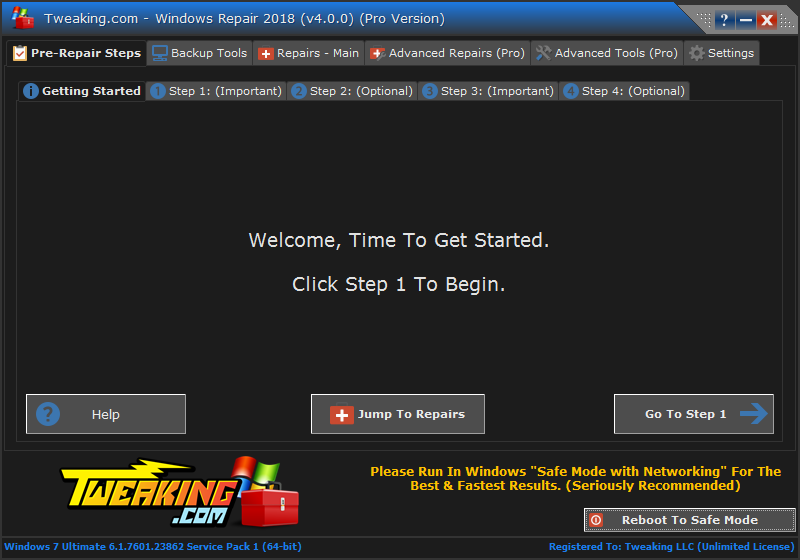
When you first run the program you will be introduced to 4 steps before the
repair options. These steps are highly recommend to do before attempting any
repairs.

Step 1. Clean Your System Of Infections.
Trying to fix a system that is currently infected is obviously a very bad idea
and can make things worse. An infection can hijack a machine and keep part of
the repairs from running correctly. Since only part of a repair will work the
other part that failed could end up causing problems. Rule of thumb before
working on a system is to make sure it is clean. Even if you think your system
is clean doing a scan before hand is a good idea.

Step 2. Check File System
Doing a check disk on the hard drive is a good idea. This will have Windows
check the file system on the drive fixing any problem it finds. Corrupt files
can break a lot of things, including the repairs. So making sure the file system
is good is a must.

Step 3. System File Check (SFC)
The built in Windows system file checker is a tool that checks that the Windows
files are intact, the correct versions and not corrupted. This is a good idea to
do before doing repairs as if a file is corrupt and we try a repair that needs
that file then the repair will fail.

Step 4. System Restore & Registry Backup
Doing a system restore point is a great idea to do before doing any repairs. If
any unforeseen problems happen after any repair than a system restore can put
the system back to the way it was before the repairs. This is highly
recommended.

Tweaking.com - Registry Backup is also bundled with the program.


Tweaking.com - Windows Repair Change Log.

v1.9.14
The awesome guys over at Malwarebytes gave me permission to allow Tweaking.com - Windows Repair to download and install Malwarebytes Anti-Malware and start a scan right from the program. This will now help make things a little easier for novice users and is a few less steps that my fellow techs need to do. When you start the program the scan option is on "Step 1" and is totally optional :-)

v1.9.13
Added msiserver service "Restore Important Windows Services" and "Repair MSI (Windows Installer)"
Added sppsvc service to the "Restore Important Windows Services"
Improved "Repair Internet Explorer", now better supports IE6 to IE 10.
"Repair Internet Explorer" now loads the list of files to register from the ie.txt file in the files folder. This gives users more control if they need it.
Improved "Repair MDAC/MS Jet"
"Repair MDAC/MS Jet" now loads the list of files to register from the mdac.txt file in the files folder. This gives users more control if they need it.

v1.9.12
Added 4 more service repairs to the "Restore Important Windows Services".
Improved repair print spooler.
Moved "Set Windows Services To Default Startup" to the bottom of the list. Since you can edit the file of what services are set to what startup, it made sense to move this last since other repairs that restore services put them back to their startup as well. This way a person can edit this file to keep any tweaks they have done to their services on the system.
Minor bug fixes and code changes.

v1.9.11
Improved "Repair Windows Update". On a very few machines the repair was unable to rename the pending.xml file. On vista and 7 this would cause the "installing update step 3 of 3" screen to never go away at boot up. By simply renaming the pending.xml file fixed this. Even though this was already part of the repair, if the file was in use at the time then it wasn't able to be renamed and the person would get stuck at the next boot. I am changed the repair to now remove any attributes from the file and set a secondary rename option directly in the registry to have windows rename the file at boot up. So now if the repair is unable to rename that file during the repair it will get rename at the next system boot. Hopefully this will now keep the "installing update step 3 of 3" screen from coming up and getting stuck. I was able to replicate this problem in Windows and the new repair fixed it in my testing.

Improved the "Repair Winsock & DNS Cache". The repair reset TCP which would also clear any static IP info set on the system. Per user request the program will now extract the static IP info, run the repair and then put the static IP info back.

v1.9.10
Improved the "Repair Windows Firewall". The program use to only restore the core of the shared access service. It didn't put any policies or rules. While helping a user in the forum they had a virus completely delete the shard access service key, including all rules. When the shared access was put back the firewall worked but he was unable to share any files. This is because there is some core things that have to be in the firewall rules in order to work. I have now added those core rules to the repair and it got his file sharing working just fine. This now makes the repair even better than before.

Added some more settings for the "Repair Windows Firewall". While helping a user in the forum the firewall was working but he couldn't get the firewall to open and would get a Group Policy error. While helping him I found the 2 reg keys that where needed to fix it. This keys are only on Vista and 7. They are not on Xp, 2003 or 8. The repair now puts these keys in on Vista and 7 only.

Added Windows Defender to the "Restore Important Windows Services" repair.

v1.9.9
Fixed bug reported by users where a folder was created on the C: drive called "Program" and windows would ask to delete or rename it, which was safe to do. The bug was with the new log settings. Bat files do not like spaces. If there was a space in the log location name it made that folder and the log was never made. The fix is to just make sure that the path is started and ended with quotation marks. I have updated all 250 locations in the program to make sure the log path has the quotation marks. This bug is now fixed.

v1.9.8
Changed the "Set Windows Services To Default Startup" repair to pull the services startup from a text file in the files folder instead of being hard coded. This will let users tweak this repair if they wish.

The program will now keep Windows from going into sleep mode or hibernation when repairs are running.

Added new repair "Repair Print Spooler"

Added "Time Elapsed" to the repair Window, so now users can see how long the repairs have been running.

Add new settings tab to the main window.

Under the new settings tab you can now change the default location for the log files.

Changed the default location of the log files from the Windows drive to the Logs folder in the program folder.

Added new repair "Restore Important Windows Services", this repair will replace all the services that the other repairs do. And as time goes I will add more services to this repair.

v1.9.7
Major changes to both "Reset Registry Permissions" and "Reset File Permissions". I found out that if you where on a non English system these two repairs simply wouldn't run and thus not change any permissions. This was because it was settings the permissions based on the names such as "Administrators" or "Everyone". On non English systems these are spelled differently and so would fail. I have changed these two repairs to set it by SID now instead of name. Example: Instead of "Administrators" it will use "S-1-5-32-544" (Which is the Windows Default SID for Administrators). These two repairs will now work on non English systems. As an added bonus, the two repairs run much faster now. The reason why is when I was using the names instead of the SID it had to go and lookup the SID of the names. Now that I am using the SID from the start it no longer has to do that lookup, thus making it run nearly twice as fast or better :-)

Fixed bug where if you opened the repair window, then closed it and then went back to it the repairs wouldn't work. This is because the program though it was in close down mode from closing the repair window. This has now been fixed.

Program now shows how many repairs are selected above the repair list. Example: "Repair Options (Selected: 10 of 35)"

The repair wmi was done in 3 steps to simply give a progress of what it is doing. Instead I have combined the 3 steps into 1.

Unhide none system files now gives a count of how many files it unhides. Also made a new status window to show when the unhide repair is running.

The Beta Repairs button will now be disabled when your running repairs.

The program now lists all fixed drives in the system for the Reset File Permissions and Unhide Non System Files repairs. Before it would only do the drive that Windows is on, now you can have it do other fixed drives as well. By default only the Windows drive is selected.

Log window now shows when a repair is being ran under the system account and the current user account.

The cmd.exe windows now show what repair it is doing in the title bar.

The program now checks if it is being run from a network path. If it is it lets the user know that due to Windows network security most repairs will fail and to please run the program locally on the system.

v1.9.6
Added renaming of the pending.xml file to the Repair Windows Updates

Due to an odd bug with the Windows 8 app store I had to disabled the reset reg permissions repair for now for Windows 8 systems. For some reason even though the app store has permissions, if you change the permissions in any way under certain keys under hkey local machine the app store will refuse to install apps and give the error code 0x8007064a. Until I can find out what keys the app store doesn't like touched I will keep this repair disabled for Windows 8.

v1.9.5
Fix bug where the program wouldn't go to the next repair if a cmd.exe was open. That means when the program was run from a bat file it wouldn't move forward. This bug was caused from a previous update. This is now fixed.

Updated the "Set Windows Services To Default Startup"

v1.9.4
On some systems, depending what programs are installed would not leave enough system resources for the reg and file permissions repair. On these systems after those repairs the rest of the repairs wouldn't work because the system was out of resources. There are two simple reg tweaks that increase the system resources Windows will use. Both repairs will now apply those two reg keys. Not only will this fix the resources being used up but should also fix any other program that runs out of resources. A reg file for these two tweaks are in the files folder with the program.

Added more files to the repair system restore.

Nearly all repairs run under the system account. As I work on the repairs I noticed something odd. Some parts of the repairs work when run under the current user account and fail under the system account, and other parts fail under the user account and work with the system account. Such as adding reg files or registering files. Here is an example registering the file blb_ps.dll under the user account works while trying to register it under the system account fails, and this only happens with a few files while the rest work fine under both. To handle this I now have some of the repairs run twice, once under the user account then again under the system account. This should handle any odd permissions between the two accounts and insure that the repairs are successful. This isn't needed on all repairs.

v1.9.3
Added a new section to the program called "Beta Repairs". There is a button on the repair window that will open it for you.
Added new beta repair "Repair System Restore" this is for Windows Vista, 7 and 8. Microsoft has no repair info on the system restore. So I monitored what services and files the system restore needs and I am working on the first known system restore repair. This is in the beta section till I get user feedback on how it works and if it gets system restore working again for people.

v1.9.2
Per user request the main repair window is now resizable.
Added 11 new file association repairs. What makes these repairs different than just clicking a reg file is on vista and newer some of the keys are locked. Since the program runs the repairs under the system account these repairs have access to those locked keys.
Added a "Tips" button that loads a page on the site with some tips on which repairs to run and tricks you can do with the program.
Changed the list in the program to a treeview.
I have some repairs unchecked by default now instead of all repairs checked.
Many code changes.

v1.9.1
Changes to the user interface.

v1.9.0
Minor Interface changes.
Program now pulls the information of each repair from a txt file instead of being directly in the program.
Added the BITS service to the Repair Windows Updates.
Added the wuauserv service to the Repair Windows Updates
Added a few more things to the Repair Windows Updates.
Added more support for Windows 8 repairs.
Added more dll files to the register system files repair.
Added new repair - "Repair Windows Safe Mode". This will put the default reg keys in order to boot into safe mode. Some viruses remove these reg keys. This will simply put the defaults back and allow safe mode to boot again.
Added more to the "Remove Policies Set By Infections" repair.
Multiple Code changes and improvements.

v1.8.0
Replaced Erunt registry backup with Tweaking.com - Registry Backup
Some new viruses have been adding programs to the Image File Execution Options in the registry. Keeping those programs from running. I have added 773 more items to the Remove Policies Set By Infections.
Added new repair "Repair Windows Snipping Tool". This will run on vista or newer and replace the reg keys needed for the snipping tool.
Added new repair "Repair .lnk (Shortcuts) File Association" This will run on vista or newer.
Updated the "Repair CD/DVD Missing/Not Working" to see if iTunes is running (Looks for ituneshelper.exe is running). If it is it puts the iTunes "UpperFilters" for the cd/dvd rom drive so iTunes wont give the error "Warning the registry setting used for importing CD are missing". More info here http://support.apple.com/kb/TS2372?viewlocale=en_US
Multiple code improvements.

v1.7.5
Improved operating system detection code. What does this mean? Some repairs need to know what version of Windows it is running run to run the correct code. The program used WMI to pull this info. But if WMI was broken it didn't pull the info. I now have it use the Windows API to pull the Windows version, and if for any reason it fails it will fall back to using WMI to pull the info.

v1.7.4
The program is now Terminal Server Aware. When you ran the program on a Windows server that had Terminal Services installed the Windows API returned the wrong path to the windows dir. This is now fixed.

v1.7.3
Updated the Repair Windows Firewall. It now restores the reg keys for the BFE, MPSSVC and WSCSVC services. Before it only put back the shared access service. Which in XP is all the firewall needed. But in Vista and 7 it required more services. They are now part of the repair :-)

v1.7.2
Small bug fixes to the log creation of the program.
I have removed the 3 options "Basic" "Advanced" and "Custom" before you start the repairs. Nearly all users that I have talk to, and myself included always choose custom anyways. No need for these other options and they have been removed. Should cut down on the confusion for new users on which to use.
New interface changes to the repair window in the program.
Added "Always On Top" option for the repair window.
Added a minimize button to the repair window. With the always on top option if something opens behind the window and the user needs to get to it they can now minimize the window.
Added a minimize button to the main window in the program for the heck of it :-)
Code improvements.

v1.7.1
Updated the Repair WMI to better handle the commands needed for the different version of Windows. While the WMI works great on XP, Vista and 7 it didn't work correctly on 2003 thus breaking WMI. I have added the commands need to have it run properly on 2003 :-)

v1.7.0
Small improvements to a few repairs.
Better support when running the program through a script. I have a good amount of repair shops that use this repair tool. Some like to run the repair tool with the silent command and from a script in a bat file. The old version of the program would close any cmd.exe window before running the repairs. This of course defeated the purpose of running through a script. So I have changed the way the program waits for a repair to finish. Instead of waiting for cmd.exe to close, each repair will now make a file. When the repair is finished it will delete the file, then the program will know to move onto the next repair.
I now have the cmd.exe windows change to a gray background with black text. This way when running the program through a script you will know which cmd.exe window belongs to the windows repair :-)
The program will now save any errors from the repairs into a txt file on the Windows drive in a folder. Example: "C:\Tweaking.com_Windows_Repair_Logs\" Multiple log files are made for the permission repairs. This is because the MS tool doesn't append to the log file, so a new file has to be made for each section. Since this could create a fair amount of log files I have the program cleanup any empty log files after the repairs are ran.

v1.6.5
Program detects if you are running in safe mode and warns that some repairs may not work in safe mode.
I have also made a few changes for all repairs to run better in safe mode. No guarantees but should definitely run better in safe mode than it has before.
Per user request you can now choose to restart or shutdown the computer after repairs.
I have the repair window resized to 750 x 550 pixels (Now bigger than before). This is the max size to fit on the screen in safe mode which is normally 800 x 600.

v1.6.4
Add ERUNT Registry backup tools. This is another option to backup the system registry before doing repairs. Also very helpful when a users system restore isn't working properly.

v1.6.3
Major improvement for the Reset File Permissions repair. On vista and newer the repair would allow access to folders windows normally blocked. Such as "C:\ProgramData\Application Data". Normally with this folder you would get an access denied. After you ran the reset file permissions repair you could access it. The side effect was that this folder points back to the C:\ProgramData folder. So it made an endless loop! The repair now checks if your on anything newer than XP. If you are then it runs a batch of commands after the repair that puts back the deny permissions on all the folders that are supposed to be blocked. This stops that endless loop from happening. 46 folders total. :-)

v1.6.2
Per user request I have added a silent command option to the program. Set the options in the setting.ini file and run the program with /silent. The program will run in custom mode running the repairs set in the settings and then close it self. Will even reboot when done if set in the settings. (Perfect option for my fellow network admins) :-)
Small code changes.

v1.6.1
Added new repair "Repair Missing Start Menu Icons Removed By Infections" This repair will put back the missing icons in the start menu, quick launch, and desktop that are moved by a rouge virus.

v1.6.0
Added new repair "Repair MSI (Windows Installer)"
Added exe fix (when a virus hijacks the exe section in the registry) to the "Remove Policies Set By Infections" repair.
Improved "Repair Windows Updates".
Small interface changes.

v1.5.8
Bug Fix: I found a very odd bug where some of the repairs were not working right. All repairs run under the system account (because of the trusted installer in vista and newer). For some reason the repairs that set registry keys by a .reg file and with regedit would run but the changes wouldn't take. The fix was to have those repairs run as the logged in account. Still scratching my head on that one, but at least now they work again :-D
Bug Fix: The repair windows firewall wasn't running all the repairs needed for it. This has now been fixed.
The Reset File Permissions now skips the "Users" folder in Vista and newer and "Documents and Settings". The reason for this is in Vista and newer there is a bug where if the file permissions are changed in the user profile then Windows thinks the file is shared when it isn't and you get a shared icon on it. More information is here http://www.tweaking.com/forums/index.php/topic,69.0.html
Small code improvements.

v1.5.7
Changed Windows Image Acquisition (WIA) from "stisvc start= demand" to "stisvc start= auto" in the windows services repair.

v1.5.6
The "Remove Policies Set By Infections" repair wasn't working properly. The commands where deleting the Reg file before it had been applied. I added the start /wait command to the regedit. "Remove Policies Set By Infections" Now works correctly :-)

v1.5.5
Removed "WwanSvc start= demand" from the windows services repair.
The program no longer defaults to the C:\ for repairs. The program now looks at the location of the Windows dir and uses the drive that Windows is on.

v1.5.4
On users machines who's "Path" variable was corrupt none of the repairs would work. To fix this I have added "set path=%SystemRoot%\system32;%SystemRoot%;%SystemRoot%\System32\Wbem" to all the repairs. Now on users systems with a corrupt "path" variable the repairs will still work properly :-)

v1.5.3
Changed 4 service defaults from manual to auto in the set services to default startup repair. Media Center Receiver Service, Media Center Scheduler Service, Windows Media Center Service Launcher and Windows Media Player Network Sharing Service.
Removed Panda cloud antivirus from the program and put Avast as a recommendation (Step 2 Window).
Added ComboFix to the recommendation page (Step 2 Window).

v1.5.2
Interface changes.

v1.5.1
Blackvipers site listed the Windows 7 wireless service startup state as manual. But when it is set to manual it will not start and thus the user has no wireless. I have updated the services startup repair tool to put the wireless to auto instead of manual.

v1.5.0
Added a new repair "Set Windows Services To Default Startup". (Currently 194 services) This will set the Windows services to their default startup state. Special thanks to http://www.blackviper.com/ for having all the default information handy. This will set the services startup by the "sc config" command and not by the registry. The information on the repair in the program lists all the services that are set.

1.4.3
The new setup file for the program was missing some of the repair files it needed. The setup has been updated and I made this new version so people who downloaded the last version will update and get the rest of the files they need.

1.4.2
Removed moving arrow from the repair window. Since the list of repairs is growing and the list is scrollable the arrow didn't work well.
In a past update I removed the custom buttons because they would cause the program to crash. The program then used the default old ugly buttons. I have made a new button control and updated the buttons so they look better, and it doesn't cause the program to crash like the old ones.
Program now asks the user if they want to create a restore point before doing repairs if they didn't have the program create one.
The program now comes in a setup program and the portable version. The new setup is larger because it contains the VB6 SP6 runtimes the program needs in case they are corrupt on the system that is being repaired.
More Code tweaks and changes.

v1.4.1
Added more files to the register system files repair that will fix "Class not registered" when trying to open a .mmc file. Such as Task scheduler, Device Manager, Computer Management and more.
Program now starts the Windows Sidebar after the Windows Sidebar repair.
Removed the security zones in IE being reset with the sidebar repair.
More code tweaks and improvements.

v1.4.0
Removed the custom buttons from the program. It was causing the program to crash on some systems. Program is meant to repair, not look pretty, so ugly standard safe buttons it is :-)
Add new repair "Repair Windows Sidebar/Gadgets"
Changed the window size of the repair window, making it smaller and easier to fit on screen for smaller resolutions.
More code tweaks.

v1.3.1
Minor GUI and code Tweaks.

v1.3.0
If you ran an older version of this repair program and it caused problems on your system, download and run this version and it will fix any problems it caused :-)
Added new repair "Repair Volume Shadow Copy Service"
Major update to the program making it safer and better at repairs. Make sure to use this new version and not the old versions.

v1.2.0
Per user request - Added a new repair "Repair CD/DVD Missing/Not Working"
Fixed bug where when repairing WMI the WMI tester would open and the program wouldn't move forward till the WMI tester was closed. Most users didn't know to close this. I have made the program now look for and close the WMI tester if it pops up during the WMI repair.

v1.1.1
Remove some files from the Register System Files repair. While this repair worked great on a lot of some systems on a few ones it would create more problems. The repair now has a much smaller list of only known good files to register.
Updated Repair IE section.
Updated Repair MDAC Section.

v1.1.0
Major changes to how the program launches the repairs. It now shows the command window doing the repair in the task bar. Also should work better with the UAC enabled and running the commands as administrator. This will also keep the program from not responding during repairs.
Updated the file permissions repair to include everyone and users full rights. It use to do just Administrators & System. But on some machines they needed more to get things working right again. This should fix that.
Replaced some of the controls in the program so the program & zip file is smaller in size.

v1.0.2
Fixed bug in Repair WMI (Hopefully got it this time)
Added link to help fix any problems someone might have with the file permissions repair.

v1.0.1
Fixed bug in Repair WMI
GUI Changes.

v1.0.0
First Release


Tweaking.com » Overview» Tweaking.com Programs » Windows Repair (All In One)
© 2013 Tweaking.com
Powered by Contentteller® Business Edition